
A Beginner-Friendly Guide to Apache DolphinScheduler: Hands-on Cloud-Native Job Scheduling

Why Do You Need DolphinScheduler?

3-Minute Quick Deployment (Beginner-Friendly)
Environment Preparation
Minimum requirements (for development):
JDK 8+
MySQL 5.7+
Zookeeper 3.8+
One-Click Docker Startup (Recommended to Avoid Pitfalls)
docker run -d --name dolphinscheduler \
-e DATABASE_TYPE=mysql \
-e SPRING_DATASOURCE_URL="jdbc:mysql://localhost:3306/ds?useUnicode=true&characterEncoding=UTF-8" \
-e SPRING_DATASOURCE_USERNAME=root \
-p 12345:12345 \
apache/dolphinscheduler:3.2.0
Core Concepts
TermAnalogy in RealityTechnical DefinitionWorkflowFactory Production LineA collection of DAG tasksTaskProduction ProcessExecution unit such as Shell/SQL/Spark etc.InstanceDaily Production BatchA specific running instance of a workflowAlertFactory Broadcasting SystemConfiguration of failure alarm channels
Step-by-Step: Create Your First Workflow (With Code)
Scenario: Daily User Behavior Analysis
Step 1: Log in to the Console
http://localhost:12345/dolphinscheduler (Default account: admin / dolphinscheduler123)
Step 2: Create a Workflow
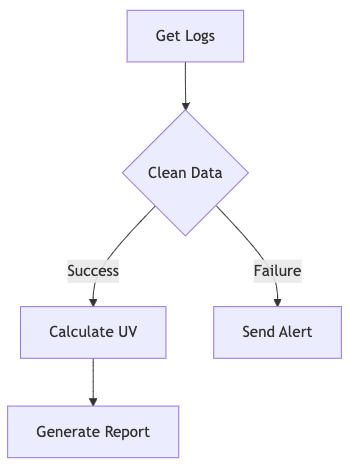
Step 3: Configure a Shell Task (Key Code)
#!/bin/bash
# Example of parameter injection
spark-submit \
  --master yarn \
  --name behavior_analysis_${sys_date} \  # System variable
  /opt/jobs/user_analysis.py ${begin_date} ${end_date}
Step 4: Set a Scheduling Policy
0 2 * * * # Executes daily at 2 AM (Quartz expression supported)
Unlock Advanced Features (Beginner-Friendly)
Parameter Passing (Cross-Task Value Transfer)
# In a Python node, retrieve upstream output
context.getUpstreamOutParam('uv_count')
Automatic Retry on Failure
# Part of workflow definition
task_retry_interval: 300  # Retry every 5 minutes
retry_times: 3            # Retry up to 3 times
Conditional Branching (Dynamic Routing)
# Determine if it's a weekend
if [ ${week} -gt 5 ]; then
   echo "skip weekend processing"
   exit 0
fi
Pitfall Prevention Tips (From Real-World Experience)
Resource Misconfiguration: Spark out-of-memory → Adjust in
conf/worker.properties
worker.worker.task.resource.limit=true
worker.worker.task.memory.max=8g  # Adjust based on your cluster
Timezone Trap: Scheduled task delayed by 8 hours → Fix in
common.properties
spring.jackson.time-zone=GMT+8
Efficiency Comparison (Convincing Metrics)
MetricCrontabAirflowDolphinSchedulerVisualization Level❌⭐⭐⭐⭐⭐⭐⭐High Availability Deployment❌⭐⭐⭐⭐⭐⭐Big Data Integration Degree⭐⭐⭐⭐⭐⭐⭐⭐⭐Learning Curve⭐⭐⭐⭐⭐⭐⭐⭐⭐
Final Thoughts
Apache DolphinScheduler is rapidly becoming the de facto standard in big data workflow scheduling. Its cloud-native architecture and user-friendly interface help developers escape the pain of managing complex task flows. For beginners, this guide serves as a great starting point for exploring more advanced features, such as cross-cluster task dispatching and Kubernetes integration.
Join the Community
There are many ways to participate and contribute to the DolphinScheduler community, including:
Documents, translation, Q&A, tests, codes, articles, keynote speeches, etc.
We assume the first PR (document, code) to contribute to be simple and should be used to familiarize yourself with the submission process and community collaboration style.
So the community has compiled the following list of issues suitable for novices: https://github.com/apache/dolphinscheduler/contribute
List of non-newbie issues:
https://github.com/apache/dolphinscheduler/issues?q=is%3Aopen+is%3Aissue+label%3A%22help+wanted%22+
How to contribute:
GitHub Code Repository: https://github.com/apache/dolphinscheduler
Official Website:https://dolphinscheduler.apache.org/en-us
Mail List:dev@dolphinscheduler@apache.org
X.com:@DolphinSchedule
YouTube:https://www.youtube.com/@apachedolphinscheduler
Slack:https://join.slack.com/t/asf-dolphinscheduler/shared_invite/zt-1cmrxsio1-nJHxRJa44jfkrNL_Nsy9Qg
Contributor Guide:https://dolphinscheduler.apache.org/en-us/community
Your Star for the project is essential, don’t hesitate to lighten a Star for Apache DolphinScheduler ❤️